
Maritime Security // Shipboard IT & OT Infrastructure
Maritime Cyber Security on Ships: Balancing Practical Common Sense Against Cosmetic Fixes
In recent years, shipboard cyber security has frequently expanded into an administrative exercise. While shipping enterprises spend considerable budgets on proprietary software and consultancy packages, daily life at sea often devolves into bridge officers taping over laptop webcams. Here is a practical breakdown separating box-ticking superficial measures from genuine vulnerabilities that lead to severe deficiencies during PSC and vetting audits.
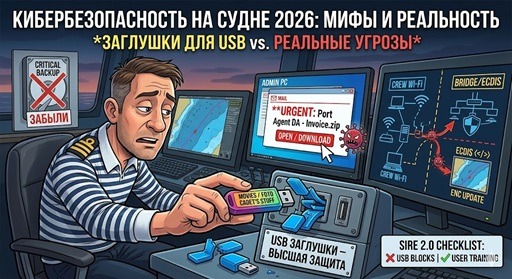
Part 1. “Security Theater” and Common Maritime IT Misconceptions
Consider the routine practices on board that generate skepticism among anyone with a foundational understanding of computer networks.
A widespread cosmetic practice on ship bridges is inserting plastic dust stoppers into unused USB ports under the premise of blocking unauthorized drives. In reality, these plastic clips can be prised out in seconds without tools. Furthermore, a hardwired keyboard cable plugged into an adjacent open port defeats the purpose of the blocker beside it.
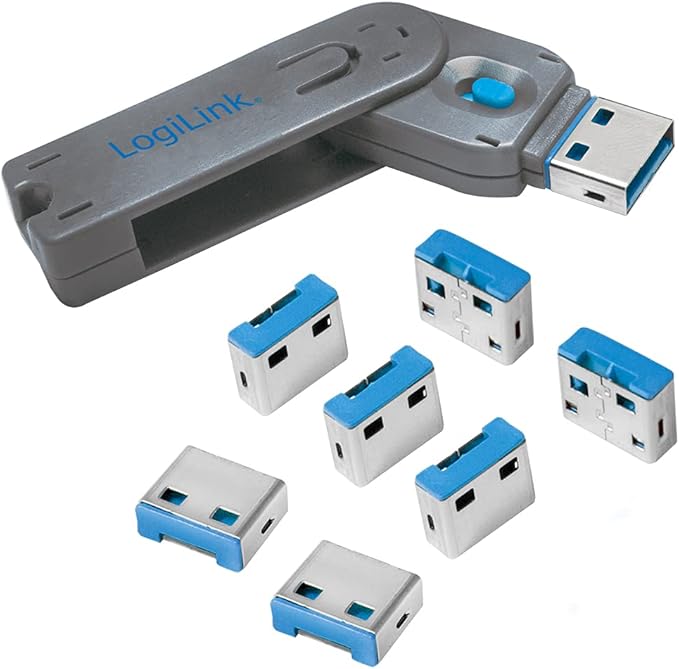
If an unauthorized visitor on the navigation bridge can approach an ECDIS console unobserved and tamper with physical ports, the vessel is suffering from a fundamental breakdown of physical access control under the ISPS Code (International Ship and Port Facility Security Code). Plastic caps serve primarily as visual indicators during cursory walk-throughs rather than functional security controls.
Inspectors routinely check under keyboards and display bezels for handwritten credentials. While leaving “12345” taped to a screen is poor practice, modern marine cyber risks do not stem from Hollywood-style physical intruders. The genuine danger originates from automated ransomware payloads transmitted through poorly configured satellite data connections.
Part 2. Real Threats: Where Merchant Ships Are Actually Vulnerable
Physical port caps are superficial; operational discipline and basic network hygiene form the true baseline of shipboard digital resilience.
The Primary Threat Vector: Inbound Email and Deceptive Attachments
Over 90% of documented cyber breaches in commercial shipping begin with a convincing spear-phishing message sent to the vessel’s official inbound email address.
- An email arrives mimicking a local port agent, bunker broker, or charterer with a plausible subject line: “Urgent: Updated Port DA for next voyage.zip” or “Revised Terminal Berthing Lineup.xlsm”;
- Under pressure during pre-arrival formalities, an officer extracts the archive on an administrative workstation tied into the vessel’s local area network;
- Consequence: Within minutes, administrative shares are locked by encryption payloads, the stability calculation computer (Loadicator) fails to boot, and the ship faces departure delays pending incident mitigation.
Unscreened USB Drives and Entertainment Media
A frequent operational pitfall involves crew members connecting personal media drives containing movies or music to shipboard computers used for administrative reports or chart corrections. Worms spread quickly across local workstations, lying dormant until a navigator uses the same machine to write chart updates to an ECDIS transfer drive.
Vessels require a strictly maintained Dedicated PC isolated from Operational Technology (OT) networks. This workstation must be reserved solely for downloading official chart updates and scanning registered USB keys using current antivirus definitions before connecting to navigation bridge equipment.
Part 3. Technical Priorities: Reliable Backups and Network Segmentation
During technical audits, demonstrating an actionable, regularly rehearsed Disaster Recovery Plan carries far more weight than physical port plugs.
- Server and Workstation Backups: If the central administrative PC hosting active maritime ship certificates, Planned Maintenance Systems (PMS), and stability data suffers hardware failure, how long will restoration take? If the response is uncertain, the vessel lacks essential data safeguards;
- Network Segmentation (VLAN Architecture): Crew welfare Wi-Fi must be kept physically or logically segregated from Operational Technology networks (OT), including the bridge, ballast systems, and engine automation. If personal mobile devices on the welfare network can ping IP addresses on the ECDIS subnet, the network architecture is deficient.
Part 4. What Auditors Look for in Modern SIRE 2.0 Audits
Under modern tanker vetting programs like SIRE 2.0, vetting inspectors evaluate crew behavior and operational discipline through practical questions:
-
“What do you do if you find an unattended USB flash drive on deck or in an alleyway?”
Correct Answer: “Deliver it immediately to the Ship Security Officer (SSO) or IT manager for quarantine and analysis. Crew members must never plug an unknown drive into any shipboard computer to check its contents.” -
“How do you verify a USB drive before transferring chart updates to ECDIS?”
Correct Answer: “We use an assigned, numbered transfer drive reserved exclusively for chart maintenance. Prior to use on the bridge, the drive is scanned on our isolated Dedicated PC running up-to-date antivirus definitions.” -
“When did the vessel last conduct a practical data restoration drill from an offline backup?”
Correct Answer: Produce the recorded log entry showing the last restoration test alongside the verified offline backup media for Loadicator and shipboard server files.
Part 5. Real-World Incidents Documented by Maritime Operators
Incident 1: Corrupted Server Files on mt Crystal Amaranto
Aboard the commercial tanker mt Crystal Amaranto, administrative documents and calculation sheets across the central server became corrupted and unreadable. The company IT investigation revealed that an officer had opened an email attachment containing a malicious script. In the absence of an isolated offline backup, the ship lost completed checklists, maintenance files, and official administrative forms spanning several months of service.
Incident 2: ECDIS Terminal Failure Caused by Personal Storage Media
When an integrated ECDIS failed to recognize its primary update drive, an officer substituted a personal USB flash drive, simply deleting visible files rather than conducting a full formatting process. Dormant malicious code in the drive’s hidden sectors corrupted system files, causing the terminal to crash repeatedly shortly before entering a pilotage channel.
Key Takeaways: Maritime Cyber Hygiene Priorities
- Discount: Superficial visual measures that provide no functional barrier to network intrusion;
- Watch for: Inbound emails with compressed attachments (.zip, .xlsm) and urgent subject lines regarding port calls;
- Maintain: Routine, isolated offline backups of loading computers, Planned Maintenance Systems, and bridge logs;
- Remember: The most frequent point of failure in shipboard security is an individual deciding to connect an unknown drive to see what is on it. Maintain clear directives in the Master Standing Orders.
Frequently Asked Questions: Shipboard Cyber Security (FAQ)